

IvorySQL Multimodal Fusion in Practice: Collaborative Verification of pgvector + AGE + pg_textsearch in One Instance
A hands-on verification that vector search (pgvector), knowledge graphs (Apache AGE), and BM25 full-text search (pg_textsearch / pg_bigm) can be installed, queried, and fused within a single IvorySQL 5.4 instance.
Wei Bo
Deputy Secretary-General, PG Branch (China)
Author: Wei Bo, Technical Consultant at Beijing Shengshu Technology Co., Ltd. and Deputy Secretary-General of the China PostgreSQL Association.
Introduction
As enterprise intelligent knowledge bases place ever-increasing demands on multimodal data processing, how to collaboratively implement vector retrieval, graph data analysis, and full-text search within the same database instance has become a practical direction worth verifying. This article takes IvorySQL 5.4 (based on PostgreSQL 18.4) as the verification target. In a Windows 11 + Docker Desktop environment, it uses the official IvorySQL image to perform hands-on verification of the collaborative capabilities of pgvector, AGE, and pg_textsearch.
1. Overall Support Overview
1.1 Research Perspective: Verifying the Feasibility of IvorySQL as a Unified Data Foundation
In an enterprise intelligent knowledge-base architecture (such as the LLM WIKI + GBrain + Agentic RAG solution), IvorySQL is positioned as the "unified data foundation" — supporting three retrieval layers simultaneously within a single database instance:
- Keyword recall: pg_textsearch / pg_bigm full-text search, ensuring exact matching of terms and numbers
- Semantic completion: pgvector vector similarity queries, covering synonym rewriting and cross-language scenarios
- Graph reasoning: Apache AGE knowledge graphs, supporting multi-hop reasoning over entity relationships
All three can perform collaborative queries inside a single PostgreSQL instance, without the need to introduce a multi-component architecture such as Elasticsearch + Milvus + Neo4j.
This article is the first in this series, focusing on basic capability verification: can the three functional domains be installed, have tables created, and execute basic queries simultaneously on IvorySQL 5.4? Subsequent articles will progressively cover dual-path hybrid retrieval, GBrain graph-storage verification, and Agentic RAG integration testing.
Verification statement: All test cases in this article have been fully verified in a Windows 11 + Docker Desktop environment, based on the official IvorySQL 5.4 image 5.4-ubi8 (PostgreSQL 18.4), with all four multimodal extensions (pgvector + AGE + pg_bigm + pg_textsearch) compiled from source and installed. To make it easy for readers to reproduce, the article uses the public image 5.4-ubi8 as a uniform baseline throughout; Section 6.1 gives the complete procedure of "bare-image quick deployment + per-extension compilation".
1.2 Extension Capability Overview
| Functional Area | Supporting Extension | Version | Support Status | Core Capabilities |
|---|---|---|---|---|
| Vector data | pgvector | 0.8.5 | ✅ Fully supported | 16,000-dim vectors, HNSW/IVFFLAT indexes, cosine/Euclidean/inner-product/Manhattan distance computation |
| Knowledge graph | Apache AGE | 1.7.0-rc0 (PG18 branch prerelease) | ✅ Fully supported | openCypher queries, property graph model, hybrid SQL queries, ACID transactions |
| Full-text search | pg_textsearch / pg_bigm / PGroonga / built-in tsvector | 0.6.1 / 1.2 / latest | ✅ Fully supported | BM25 ranking, CJK tokenization, fuzzy search, phrase search |
2. Vector Data Support in Detail
2.1 Technical Solution
IvorySQL implements vector data support through the pgvector extension. pgvector is the most important vector extension in the PostgreSQL ecosystem. IvorySQL has officially adapted it since version 3.0, and in the latest 5.4 release it has further strengthened its AI capabilities by adding the pg_ai_query extension.
Naming convention: pgvector is the community name of the project; the extension inside the database is named
vector, corresponding toCREATE EXTENSION vector. The rest of this article refers to it collectively as "the pgvector extension" to stay consistent with the project documentation, but all SQL commands use the extension namevector.
2.2 Core Features
- High-dimensional support: up to 16,000-dimensional vectors
- Index algorithms:
- HNSW (Hierarchical Navigable Small World): better query performance, supports real-time insertion
- IVFFLAT (Inverted File Flat): faster to build, lower memory footprint
- Distance metrics:
- Euclidean distance (
<->) - Cosine similarity (
<=>) - Inner product (
<#>) - Manhattan distance (
<+>, v0.7.0+)
- Euclidean distance (
- Oracle compatibility mode: pgvector is fully usable in IvorySQL's Oracle compatibility mode, and the vector type can be used in PL/SQL anonymous blocks, stored procedures, and functions
2.3 Suitable Scenarios
- RAG (retrieval-augmented generation) semantic search
- E-commerce product similarity recommendation
- Image/audio feature retrieval
- AI embedding storage and retrieval
3. Knowledge Graph Support in Detail
3.1 Technical Solution
IvorySQL provides graph database capability through the Apache AGE (A Graph Extension) extension. AGE is PostgreSQL's graph database extension, supporting the openCypher query language.
3.2 Core Features
- Property graph model: native support for property graphs inside PostgreSQL
- openCypher syntax: compatible with Neo4j query syntax
- Hybrid SQL queries: graph query results can be JOINed with relational tables for combined graph + relational analysis
- ACID transactions: inherits PostgreSQL's transactional capabilities
- Graph structure: supports Graph (graph space), Vertex (node), Edge (edge), Label, and Property
3.3 Suitable Scenarios
- Social network analysis
- Knowledge graph construction and query
- Fraud detection
- Recommendation systems
- Path planning
- GraphRAG (graph-augmented RAG)
3.4 Important Note
Apache AGE gives IvorySQL graph data processing capabilities, but IvorySQL is fundamentally still a relational database. For very large graph scenarios (billion-node scale or larger, high-concurrency multi-hop traversal), it is recommended to use a dedicated graph database (such as TuGraph or NebulaGraph) together with it to obtain better graph traversal performance.
⚠️ Version risk note: This article compiles and installs AGE from the
PG18/v1.7.0-rc0prerelease branch (the current latest stable version for pg18 is v1.8.0, released on 2026-07-03). The core functionality of the RC version is usable, but in production it is recommended to wait for the official release before going live, or to fully test compatibility and stability before upgrading.
4. Full-Text Search Support in Detail
4.1 Technical Solution
IvorySQL provides a multi-tier full-text search solution:
| Extension Name | Version | Functional Positioning | Suitable Scenarios |
|---|---|---|---|
| pg_textsearch | 0.6.1 | High-performance BM25 full-text search, optimized for AI workloads | Document retrieval, hybrid search (vector + full-text) |
| pg_bigm | 1.2 | Bigram (2-gram) tokenization, optimized for CJK text | Short-keyword fuzzy matching, similarity queries |
| PGroonga | latest | Full-text search enhancement | Multilingual full-text search |
| zhparser | latest | Chinese word segmentation | Precise Chinese search |
| pg_jieba | latest | Chinese jieba segmentation | Chinese semantic segmentation search |
| Built-in tsvector | PG native | Standard full-text search | Multilingual configurable retrieval |
4.2 Core Features
- BM25 relevance ranking: pg_textsearch provides a modern BM25 ranking function
- Hybrid search: can be combined with vector retrieval for semantic + keyword dual recall
- CJK optimization: pg_bigm handles CJK text efficiently through 2-gram tokenization without any dictionary
- Fuzzy search: supports similarity-threshold control (the
=%operator) - Phrase search: supports keyword-order matching (the slop parameter controls the gap)
4.3 Selection Guide: When to Use Which?
The multiple full-text search options are not a matter of "just pick one and use it" — they solve different problems. First, distinguish the two categories:
- Retrieval / ranking engines: provide the complete "how to search, how to rank" capability, ready to use out of the box. Representatives: pg_bigm (2-gram fuzzy), pg_textsearch (BM25 ranking).
- Chinese word segmenters (tsvector parsers): only responsible for "splitting Chinese into the right words"; they do not perform retrieval or ranking themselves and must be used together with PostgreSQL's built-in
tsvector+ts_rank. Representatives: zhparser, pg_jieba (underlyingly dependent on the SCWS / jieba dictionaries respectively).
Retrieval / Ranking Engine Comparison (pg_bigm vs pg_textsearch)
| Dimension | pg_bigm | pg_textsearch |
|---|---|---|
| Core algorithm | 2-gram bigram tokenization | BM25 relevance ranking |
| Text processing | Sliding character windows, no dictionary needed | Depends on PostgreSQL language configuration (english/simple, etc.) |
| Chinese adaptation | ✅ Natively supports CJK, no tokenizer to install | ❌ Requires additional Chinese tokenization setup (zhparser/pg_jieba) |
| Ranking method | Similarity-threshold judgment (=%) | Relevance-score ranking (the more negative, the better) |
| Query method | LIKE, likequery fuzzy matching | <@> operator, phrase/keyword search |
| Typical scenarios | Short-keyword fuzzy search, completing "names you can't quite remember" | Document retrieval, RAG coarse ranking, Top-K ranking |
| Maturity | Stable (v1.2) | No plugins are preinstalled in the official image |
Chinese Word Segmenters (tsvector parser): zhparser / pg_jieba
| Dimension | zhparser | pg_jieba |
|---|---|---|
| Type | tsvector Chinese word segmenter | tsvector Chinese word segmenter |
| Underlying dependency | SCWS Chinese word-segmentation dictionary library | jieba segmentation dictionary |
| How to use | CREATE TEXT SEARCH CONFIGURATION ... PARSER = zhparser, wired into the built-in tsvector | Same as left, wired into the built-in tsvector |
| Relationship to the above | Does not directly compete with pg_bigm / pg_textsearch; instead provides Chinese word-segmentation capability for tsvector | Same as left |
| Typical scenarios | Precise Chinese full-text search (use tsvector + ts_rank when ranking is needed) | Chinese semantic segmentation search |
⚠️ Note: zhparser / pg_jieba belong to the "tokenization layer". You must first install the SCWS dictionary library at the system level and then compile the extension — their dependencies are heavier than pg_bigm / pg_textsearch. Moreover, they only solve "how Chinese words are split"; ranking still requires the built-in
tsvector+ts_rank. The main thread of verification in this article focuses on "four extensions coexisting in one instance" (preinstalled pgvector + AGE + pg_bigm + pg_textsearch), so zhparser was not included in the experiments and is only marked with its positioning in the capability list. When precise Chinese tokenization is needed, it can be installed additionally on this basis and wired in through tsvector.
A simple rule of thumb:
- Can't remember the exact name and need fuzzy completion → pg_bigm
- Need relevance ranking and Top-N document retrieval → pg_textsearch
- Combine both → pg_bigm coarse filtering + pg_textsearch precise ranking
- Need precise Chinese tokenization (wired into tsvector) → zhparser / pg_jieba (requires the SCWS dependency)
Additional note: PGroonga provides more comprehensive multilingual full-text search (including Chinese); the built-in tsvector is the native PG option, suited to scenarios that already have tokenization requirements.
5. Version and Deployment Recommendations
5.1 Version Selection
- Recommended version: IvorySQL 5.4 (based on PostgreSQL 18.4, released June 2026)
- Most complete ecosystem: covers 20+ extensions for AI, GIS, full-text search, operations monitoring, and more
- Cloud-native support: offers multiple deployment methods such as Docker, K8s, and Operator
5.2 Deployment Method Comparison
| Method | Difficulty | Suitable Scenarios | Time |
|---|---|---|---|
| Docker | ⭐ Extremely simple | Development/testing, quick evaluation | 5 minutes |
| YUM/DNF | ⭐⭐ Simple | Production environments (EL8/EL9) | 15 minutes |
| DEB | ⭐⭐ Simple | Production environments (Debian/Ubuntu) | 15 minutes |
| Source compilation | ⭐⭐⭐⭐ Complex | Custom requirements, study and research | 30-60 minutes |
6. Hands-On Guide: Verifying Multimodal Fusion
6.1 Environment Preparation (Quick Docker Deployment)
Environment note: The following commands have been verified on Windows 11 + Docker Desktop. These docker commands also work on macOS (Docker Desktop) and Linux (Docker Engine); only the Docker installation method differs.
# 1. Install Docker Desktop (if not already installed)
# Windows/macOS: download and install from https://www.docker.com/products/docker-desktop/
# Linux: sudo apt install docker.io or sudo yum install docker-ce

# 2. Pull the IvorySQL 5.4 image (domestic registry)
docker pull registry.highgo.com/ivorysql/ivorysql:5.4-ubi8

# 3. Start the container (port mapping can be adjusted to your environment; POSTGRES_INITDB_ARGS ensures UTF-8 encoding)
#    Note: the official 5.4-ubi8 image only preinstalls the Oracle-compat base extensions, not the multimodal ones;
#          after startup you need to compile pgvector / AGE / pg_bigm / pg_textsearch as described in the "Extension Installation" subsection below.
docker run --name ivorysql-verify \
  -p 5434:5432 \
  -e POSTGRES_INITDB_ARGS="--encoding=UTF8 --locale=C.utf8" \
  -e IVORYSQL_PASSWORD=IvorySQL@2026 \
  -e IVORYSQL_DB=ivorysql \
  -d registry.highgo.com/ivorysql/ivorysql:5.4-ubi8

# 4. Wait for startup to finish (run the following commands after about 10 seconds)
docker logs --tail 5 ivorysql-verify

# 5. Connect to the database (all subsequent operations run in this session)
docker exec -it ivorysql-verify psql -U ivorysql -d ivorysql
Extension Installation: pgvector / AGE / pg_bigm / pg_textsearch
The
ivorysql-verifycontainer started with the official5.4-ubi8image in 6.1 above ships with only the Oracle-compat base extensions preinstalled (ivorysql_ora,liboracle_parser,gb18030_2022), and no multimodal extensions preinstalled. Therefore all four extensions (pgvector + AGE + pg_bigm + pg_textsearch) must be compiled from source and installed as described below. All of the following operations are executed inside the container (enter it withdocker exec -it ivorysql-verify bash).
1. Install the build tools (run once)
dnf install -y gcc gcc-c++ make bison flex git readline-devel zlib-devel
2. pgvector — vector retrieval
cd /tmp
git clone --depth 1 --branch v0.8.5 https://github.com/pgvector/pgvector.git pgvector-build
cd pgvector-build
PG_CONFIG=/var/local/ivorysql/ivorysql-5/bin/pg_config
make PG_CONFIG=$PG_CONFIG && make PG_CONFIG=$PG_CONFIG install
3. Apache AGE — graph database extension AGE adds openCypher graph query capability to PostgreSQL, supporting the property graph model and hybrid Cypher + SQL queries.
cd /tmp
git clone --depth 1 --branch PG18/v1.7.0-rc0 https://github.com/apache/age.git age-build
cd age-build
PG_CONFIG=/var/local/ivorysql/ivorysql-5/bin/pg_config
make PG_CONFIG=$PG_CONFIG && make PG_CONFIG=$PG_CONFIG install
4. pg_bigm — CJK bigram tokenization pg_bigm slices Chinese and English characters uniformly through a 2-gram sliding window, delivering efficient fuzzy search without any dictionary.
cd /tmp
git clone --depth 1 https://github.com/pgbigm/pg_bigm.git pg_bigm-build
cd pg_bigm-build
INCDIR=$(/var/local/ivorysql/ivorysql-5/bin/pg_config --includedir-server)
PKGLIB=$(/var/local/ivorysql/ivorysql-5/bin/pg_config --pkglibdir)
SHAREDIR=$(/var/local/ivorysql/ivorysql-5/bin/pg_config --sharedir)/extension
gcc -fPIC -O2 -I$INCDIR -c bigm_op.c bigm_gin.c
gcc -shared -o pg_bigm.so bigm_op.o bigm_gin.o
cp pg_bigm.so $PKGLIB/
cp *.sql pg_bigm.control $SHAREDIR/
Note: pg_bigm's
makedepends on PGXS (which is absent from the image); the commands above bypass this limitation by compiling directly with gcc.
5. pg_textsearch — BM25 full-text search pg_textsearch introduces the BM25 (Best Match 25) relevance ranking algorithm to PostgreSQL, supporting phrase search and Top-K queries. This article compiles its v0.6.1 source code (an early version; a stable v1.x has been released).
cd /tmp
git clone --depth 1 https://github.com/timescale/pg_textsearch.git pg_textsearch-build
cd pg_textsearch-build
git fetch --tags && git checkout v0.6.1
PG_CONFIG=/var/local/ivorysql/ivorysql-5/bin/pg_config
make PG_CONFIG=$PG_CONFIG && make PG_CONFIG=$PG_CONFIG install
Both pg_textsearch and Apache AGE require configuring
shared_preload_librariesinivorysql.conffollowed by a database restart. If AGE's memory hooks and transaction hooks are not mounted at startup, a session-levelLOAD 'age'only works temporarily and carries a memory-leak risk — preloading is mandatory in production.
# Add age and pg_textsearch to the preload list together
sed -i "s/shared_preload_libraries = .*/shared_preload_libraries = 'gb18030_2022, liboracle_parser, ivorysql_ora, age, pg_textsearch'/" \
  /var/local/ivorysql/ivorysql-5/data/ivorysql.conf

# Exit the container, then restart it
exit
docker restart ivorysql-verify
# Wait about 5 seconds, then re-enter the database
docker exec -it ivorysql-verify psql -U ivorysql -d ivorysql
Installation verification:
SELECT name FROM pg_available_extensions
WHERE name IN ('vector','age','pg_bigm','pg_textsearch');
-- Should return the four rows vector | age | pg_bigm | pg_textsearch
Runtime verification (confirm all extensions loaded successfully after the database starts):
SELECT extname, extversion FROM pg_extension
WHERE extname IN ('vector','age','pg_textsearch','pg_bigm') ORDER BY extname;
-- Should return the four rows age | pg_bigm | pg_textsearch | vector
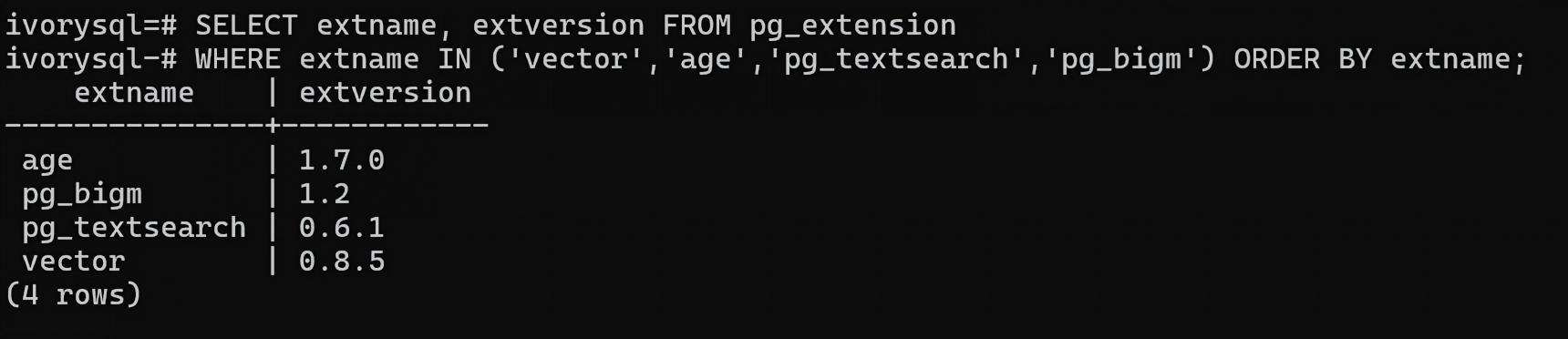
All of the following operations are executed in this psql session — do not switch instances midway.
6.2 Vector Retrieval (pgvector)
Verification scenario: simulates e-commerce product recommendation — 5 products (3 electronics + 2 shoes/bags), each with a 120-dimension feature vector. Verification goals: 1) whether cosine/Euclidean distance correctly rank similar products; 2) whether the HNSW index speeds up queries; 3) whether WHERE-condition filtering precisely excludes unrelated categories.
Reader's guide: each operation below contains the SQL command, the expected output, and a reserved slot for the screenshot.
Operation 1-1: Create the pgvector Extension
CREATE EXTENSION IF NOT EXISTS vector;
Expected output: CREATE EXTENSION or NOTICE: extension "vector" already exists, skipping

Operation 1-2: Create the Product Vector Table
CREATE TABLE product_vectors (
    id SERIAL PRIMARY KEY,
    product_name VARCHAR(100),
    category VARCHAR(50),
    embedding vector(120)
);
Verify with: \d product_vectors
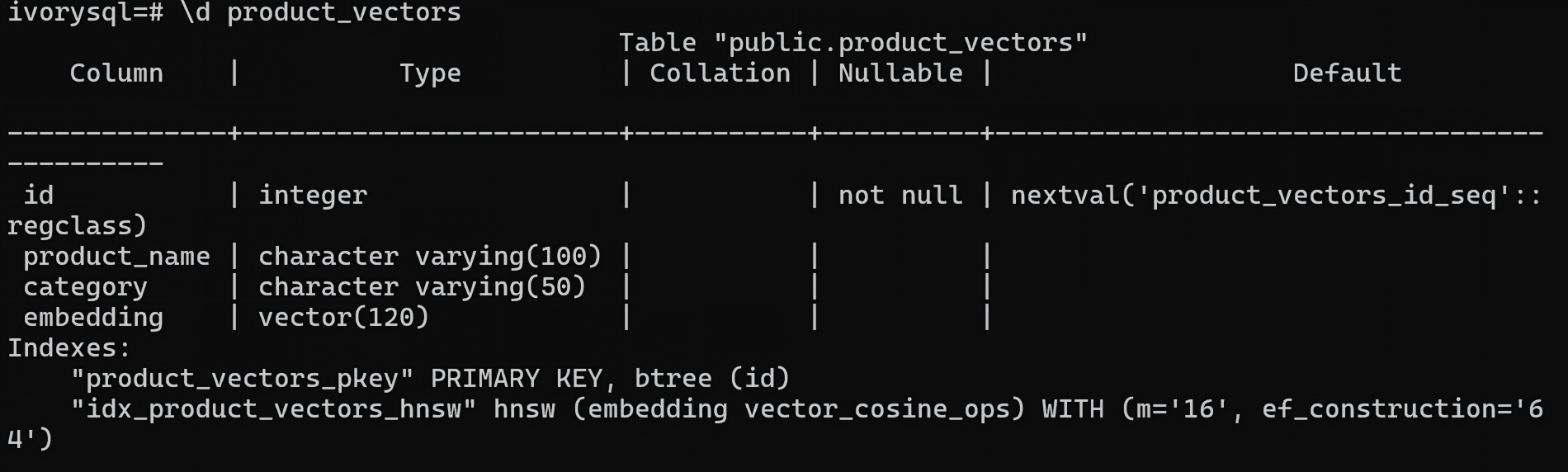
| Column | Type | Description |
|---|---|---|
| id | integer | Auto-increment primary key |
| product_name | varchar(100) | Product name |
| category | varchar(50) | Product category |
| embedding | vector(120) | 120-dimension feature vector (for demonstration; production can use real 768/1536-dim embeddings) |
Operation 1-3: Insert 5 Test Records
INSERT INTO product_vectors (product_name, category, embedding) VALUES
('智能手表 Pro', '电子产品', '[0.12, 0.34, 0.56, 0.78, 0.91, 0.23, 0.45, 0.67, 0.89, 0.01, 0.12, 0.34, 0.56, 0.78, 0.91, 0.23, 0.45, 0.67, 0.89, 0.01, 0.12, 0.34, 0.56, 0.78, 0.91, 0.23, 0.45, 0.67, 0.89, 0.01, 0.12, 0.34, 0.56, 0.78, 0.91, 0.23, 0.45, 0.67, 0.89, 0.01, 0.12, 0.34, 0.56, 0.78, 0.91, 0.23, 0.45, 0.67, 0.89, 0.01, 0.12, 0.34, 0.56, 0.78, 0.91, 0.23, 0.45, 0.67, 0.89, 0.01, 0.12, 0.34, 0.56, 0.78, 0.91, 0.23, 0.45, 0.67, 0.89, 0.01, 0.12, 0.34, 0.56, 0.78, 0.91, 0.23, 0.45, 0.67, 0.89, 0.01, 0.12, 0.34, 0.56, 0.78, 0.91, 0.23, 0.45, 0.67, 0.89, 0.01, 0.12, 0.34, 0.56, 0.78, 0.91, 0.23, 0.45, 0.67, 0.89, 0.01, 0.12, 0.34, 0.56, 0.78, 0.91, 0.23, 0.45, 0.67, 0.89, 0.01, 0.12, 0.34, 0.56, 0.78, 0.91, 0.23, 0.45, 0.67, 0.89, 0.01, 0.12, 0.34, 0.56, 0.78, 0.91, 0.23, 0.45, 0.67, 0.89, 0.01]'),
('运动手环',     '电子产品', '[0.11, 0.33, 0.55, 0.77, 0.90, 0.22, 0.44, 0.66, 0.88, 0.02, 0.11, 0.33, 0.55, 0.77, 0.90, 0.22, 0.44, 0.66, 0.88, 0.02, 0.11, 0.33, 0.55, 0.77, 0.90, 0.22, 0.44, 0.66, 0.88, 0.02, 0.11, 0.33, 0.55, 0.77, 0.90, 0.22, 0.44, 0.66, 0.88, 0.02, 0.11, 0.33, 0.55, 0.77, 0.90, 0.22, 0.44, 0.66, 0.88, 0.02, 0.11, 0.33, 0.55, 0.77, 0.90, 0.22, 0.44, 0.66, 0.88, 0.02, 0.11, 0.33, 0.55, 0.77, 0.90, 0.22, 0.44, 0.66, 0.88, 0.02, 0.11, 0.33, 0.55, 0.77, 0.90, 0.22, 0.44, 0.66, 0.88, 0.02, 0.11, 0.33, 0.55, 0.77, 0.90, 0.22, 0.44, 0.66, 0.88, 0.02, 0.11, 0.33, 0.55, 0.77, 0.90, 0.22, 0.44, 0.66, 0.88, 0.02, 0.11, 0.33, 0.55, 0.77, 0.90, 0.22, 0.44, 0.66, 0.88, 0.02, 0.11, 0.33, 0.55, 0.77, 0.90, 0.22, 0.44, 0.66, 0.88, 0.02, 0.11, 0.33, 0.55, 0.77, 0.90, 0.22, 0.44, 0.66, 0.88, 0.02]'),
('真皮皮鞋',     '服饰鞋包', '[0.05, 0.15, 0.25, 0.35, 0.45, 0.55, 0.65, 0.75, 0.85, 0.95, 0.05, 0.15, 0.25, 0.35, 0.45, 0.55, 0.65, 0.75, 0.85, 0.95, 0.05, 0.15, 0.25, 0.35, 0.45, 0.55, 0.65, 0.75, 0.85, 0.95, 0.05, 0.15, 0.25, 0.35, 0.45, 0.55, 0.65, 0.75, 0.85, 0.95, 0.05, 0.15, 0.25, 0.35, 0.45, 0.55, 0.65, 0.75, 0.85, 0.95, 0.05, 0.15, 0.25, 0.35, 0.45, 0.55, 0.65, 0.75, 0.85, 0.95, 0.05, 0.15, 0.25, 0.35, 0.45, 0.55, 0.65, 0.75, 0.85, 0.95, 0.05, 0.15, 0.25, 0.35, 0.45, 0.55, 0.65, 0.75, 0.85, 0.95, 0.05, 0.15, 0.25, 0.35, 0.45, 0.55, 0.65, 0.75, 0.85, 0.95, 0.05, 0.15, 0.25, 0.35, 0.45, 0.55, 0.65, 0.75, 0.85, 0.95, 0.05, 0.15, 0.25, 0.35, 0.45, 0.55, 0.65, 0.75, 0.85, 0.95, 0.05, 0.15, 0.25, 0.35, 0.45, 0.55, 0.65, 0.75, 0.85, 0.95, 0.05, 0.15, 0.25, 0.35, 0.45, 0.55, 0.65, 0.75, 0.85, 0.95]'),
('跑步运动鞋',   '服饰鞋包', '[0.06, 0.16, 0.26, 0.36, 0.46, 0.56, 0.66, 0.76, 0.86, 0.96, 0.06, 0.16, 0.26, 0.36, 0.46, 0.56, 0.66, 0.76, 0.86, 0.96, 0.06, 0.16, 0.26, 0.36, 0.46, 0.56, 0.66, 0.76, 0.86, 0.96, 0.06, 0.16, 0.26, 0.36, 0.46, 0.56, 0.66, 0.76, 0.86, 0.96, 0.06, 0.16, 0.26, 0.36, 0.46, 0.56, 0.66, 0.76, 0.86, 0.96, 0.06, 0.16, 0.26, 0.36, 0.46, 0.56, 0.66, 0.76, 0.86, 0.96, 0.06, 0.16, 0.26, 0.36, 0.46, 0.56, 0.66, 0.76, 0.86, 0.96, 0.06, 0.16, 0.26, 0.36, 0.46, 0.56, 0.66, 0.76, 0.86, 0.96, 0.06, 0.16, 0.26, 0.36, 0.46, 0.56, 0.66, 0.76, 0.86, 0.96, 0.06, 0.16, 0.26, 0.36, 0.46, 0.56, 0.66, 0.76, 0.86, 0.96, 0.06, 0.16, 0.26, 0.36, 0.46, 0.56, 0.66, 0.76, 0.86, 0.96, 0.06, 0.16, 0.26, 0.36, 0.46, 0.56, 0.66, 0.76, 0.86, 0.96, 0.06, 0.16, 0.26, 0.36, 0.46, 0.56, 0.66, 0.76, 0.86, 0.96]'),
('无线耳机',     '电子产品', '[0.13, 0.35, 0.57, 0.79, 0.92, 0.24, 0.46, 0.68, 0.90, 0.02, 0.13, 0.35, 0.57, 0.79, 0.92, 0.24, 0.46, 0.68, 0.90, 0.02, 0.13, 0.35, 0.57, 0.79, 0.92, 0.24, 0.46, 0.68, 0.90, 0.02, 0.13, 0.35, 0.57, 0.79, 0.92, 0.24, 0.46, 0.68, 0.90, 0.02, 0.13, 0.35, 0.57, 0.79, 0.92, 0.24, 0.46, 0.68, 0.90, 0.02, 0.13, 0.35, 0.57, 0.79, 0.92, 0.24, 0.46, 0.68, 0.90, 0.02, 0.13, 0.35, 0.57, 0.79, 0.92, 0.24, 0.46, 0.68, 0.90, 0.02, 0.13, 0.35, 0.57, 0.79, 0.92, 0.24, 0.46, 0.68, 0.90, 0.02, 0.13, 0.35, 0.57, 0.79, 0.92, 0.24, 0.46, 0.68, 0.90, 0.02, 0.13, 0.35, 0.57, 0.79, 0.92, 0.24, 0.46, 0.68, 0.90, 0.02, 0.13, 0.35, 0.57, 0.79, 0.92, 0.24, 0.46, 0.68, 0.90, 0.02, 0.13, 0.35, 0.57, 0.79, 0.92, 0.24, 0.46, 0.68, 0.90, 0.02, 0.13, 0.35, 0.57, 0.79, 0.92, 0.24, 0.46, 0.68, 0.90, 0.02]');
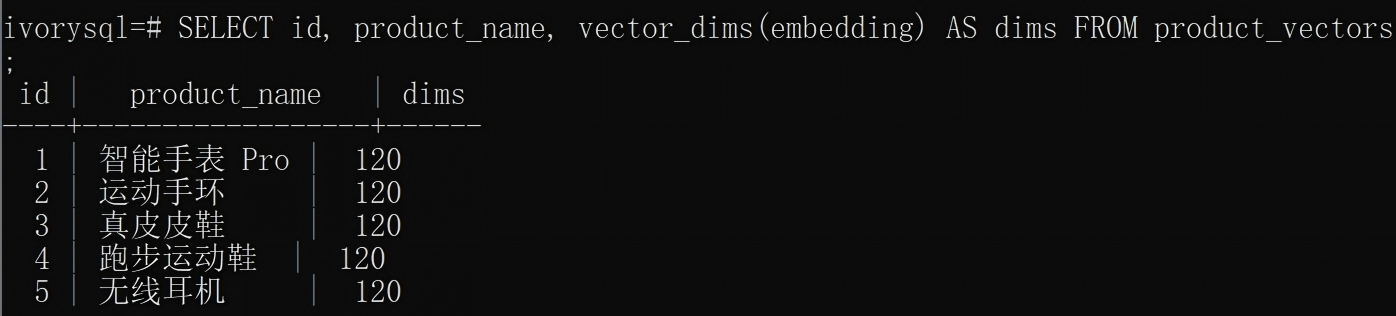
Note: the 120-dimension vector is constructed by repeating a feature pattern with
vector_dims=1012 times, so it can be checked by hand (this does not change the query semantics). In production, replace it with real 768/1536-dimension vectors output by an embedding model.
SELECT id, product_name, vector_dims(embedding) AS dims FROM product_vectors;
| id | product_name | dims |
|---|---|---|
| 1 | Smart Watch Pro | 120 |
| 2 | Fitness Band | 120 |
| 3 | Genuine Leather Shoes | 120 |
| 4 | Running Shoes | 120 |
| 5 | Wireless Earbuds | 120 |
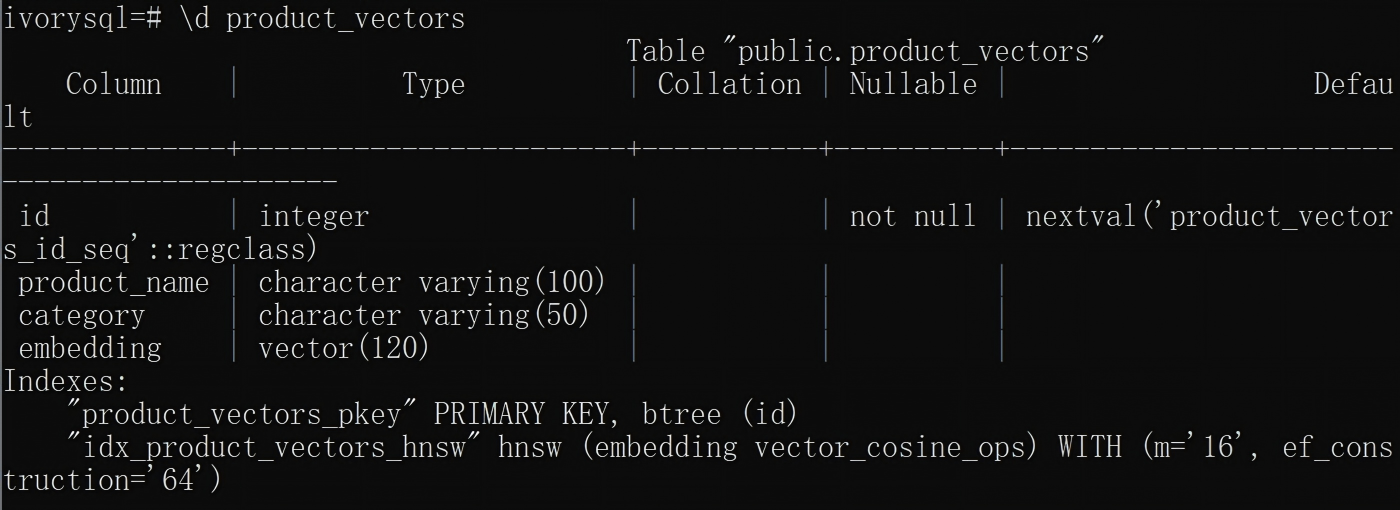
Operation 1-4: Create the HNSW Index
CREATE INDEX idx_product_vectors_hnsw ON product_vectors
USING hnsw (embedding vector_cosine_ops)
WITH (m = 16, ef_construction = 64);
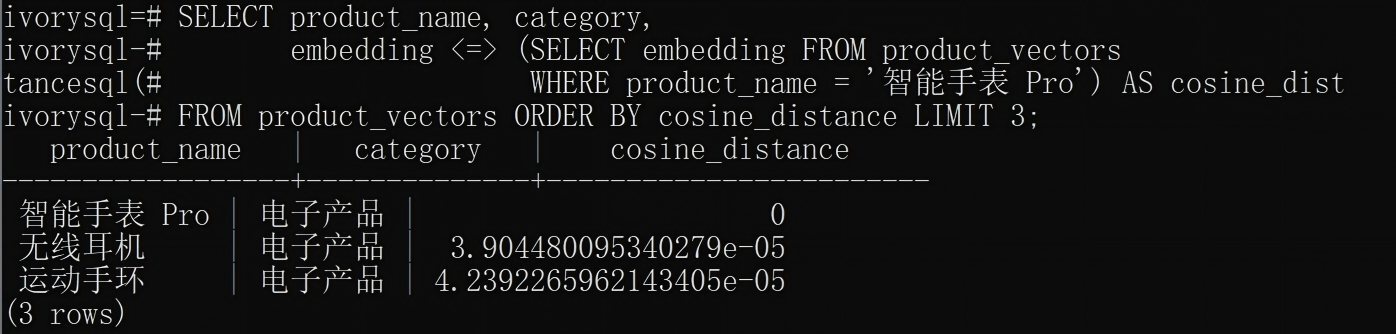
Operation 1-5: Cosine Distance Query
SELECT product_name, category,
       embedding <=> (SELECT embedding FROM product_vectors
                      WHERE product_name = '智能手表 Pro') AS cosine_distance
FROM product_vectors ORDER BY cosine_distance LIMIT 3;
| product_name | category | cosine_distance |
|---|---|---|
| Smart Watch Pro | Electronics | 0.000000 |
| Wireless Earbuds | Electronics | 0.000039 |
| Fitness Band | Electronics | 0.000042 |
| Running Shoes | Apparel, Shoes & Bags | 0.230686 |
| Genuine Leather Shoes | Apparel, Shoes & Bags | 0.233892 |
Cosine distance close to 0 = the more similar the vector directions.
Operation 1-6: Euclidean Distance Query
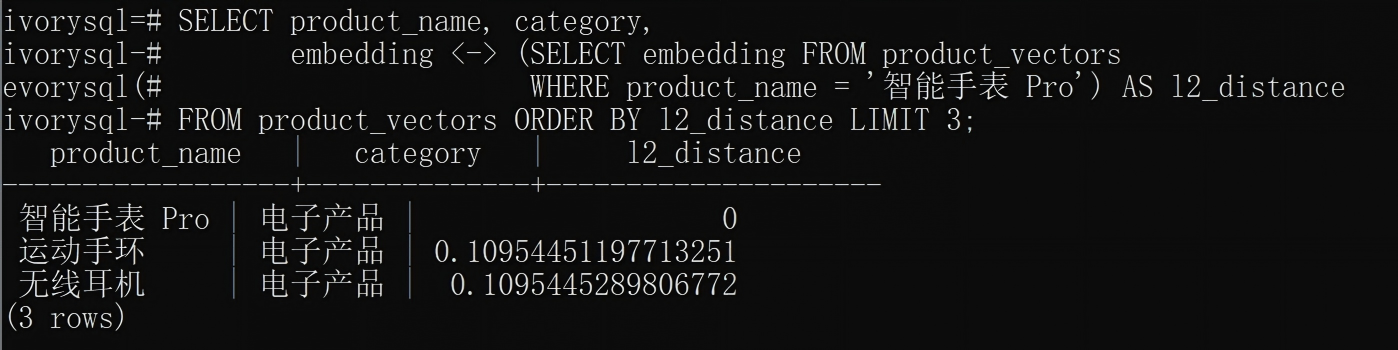
SELECT product_name, category,
       embedding <-> (SELECT embedding FROM product_vectors
                      WHERE product_name = '智能手表 Pro') AS l2_distance
FROM product_vectors ORDER BY l2_distance LIMIT 3;
| product_name | category | l2_distance |
|---|---|---|
| Smart Watch Pro | Electronics | 0.000000 |
| Fitness Band | Electronics | 0.109545 |
| Wireless Earbuds | Electronics | 0.109545 |
| Genuine Leather Shoes | Apparel, Shoes & Bags | 4.337188 |
| Running Shoes | Apparel, Shoes & Bags | 4.339677 |
Euclidean and cosine produce different orderings — the two metrics each emphasize different aspects.
Operation 1-7: Category-Filtered Query
SELECT product_name,
       embedding <=> (SELECT embedding FROM product_vectors
                      WHERE product_name = '智能手表 Pro') AS cosine_distance
FROM product_vectors WHERE category = '电子产品' ORDER BY cosine_distance LIMIT 3;
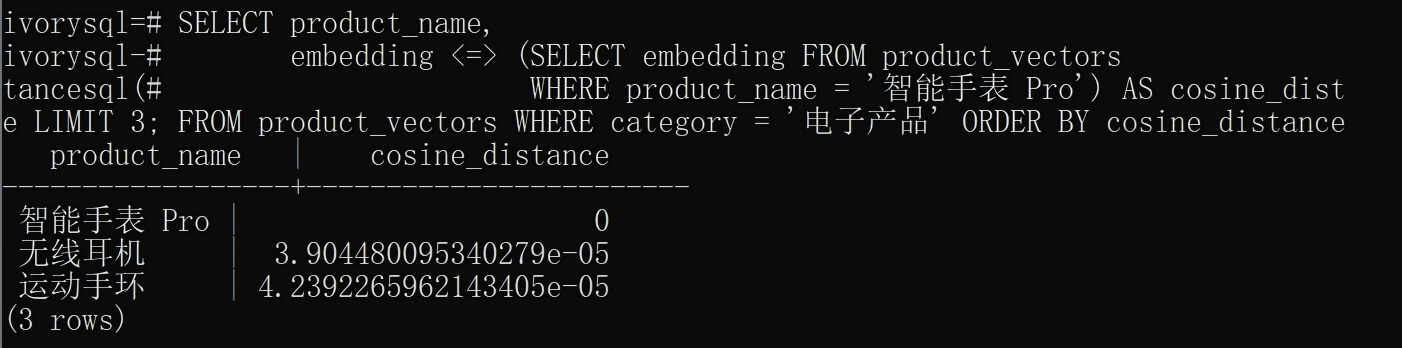
✅ Vector retrieval verification complete.
Operation 1-8: Oracle Compatibility Mode Verification
Verifies that pgvector is equally usable in IvorySQL's Oracle compatibility mode, including
number-type primary keys and Oracle-style string quoting.
-- 1. Switch to Oracle compatibility mode
SET ivorysql.compatible_mode = oracle;

-- 2. Create a test table (number-type primary key, vector column)
CREATE TABLE test_ora_vec (id number, embedding vector(3));

-- 3. Insert data (Oracle style uses single quotes)
INSERT INTO test_ora_vec VALUES (1, '[1, 2, 3]');
INSERT INTO test_ora_vec VALUES (2, '[1, 1, 9]');
INSERT INTO test_ora_vec VALUES (3, '[9, 9, 1]');

-- 4. Order by cosine distance
SELECT id, embedding <=> '[1, 2, 3]' AS dist
FROM test_ora_vec ORDER BY dist;

-- 5. Switch back to PG mode
SET ivorysql.compatible_mode = pg;

-- 6. Clean up
DROP TABLE test_ora_vec;

6.3 Knowledge Graph (Apache AGE)
Verification scenario: build a simplified "IvorySQL technology ecosystem graph" — nodes represent database products and providers, edges represent "based on" and "integrates" relationships. Verification goals: 1) the basic Cypher operations for creating nodes and relationships; 2) whether MATCH graph queries return the correct entity relationships; 3) whether multi-hop traversal (1–3 hops) can discover indirect associations along relationship chains. The result is a small knowledge graph available for path traversal.
⚠️ Important: all Apache AGE functions (
create_graph,cypher, etc.) live in theag_catalogschema. A new psql session requires three initialization steps:CREATE EXTENSION→LOAD 'age'→SET search_path— none can be omitted. Otherwise you will getfunction cypher(unknown) does not existorunhandled cypher(cstring) function call.
Operation 2-1: Create the Extension and Knowledge Graph
-- 1. Create the extension
CREATE EXTENSION IF NOT EXISTS age;

-- 2. Load the extension library (critical! otherwise cypher() reports function not found)
LOAD 'age';

-- 3. Set search_path (critical! must be run in every new session)
SET search_path = ag_catalog, "$user", public;

-- 4. Create the knowledge graph
SELECT create_graph('tech_kg');

-- 5. View all graphs
SELECT * FROM ag_graph;

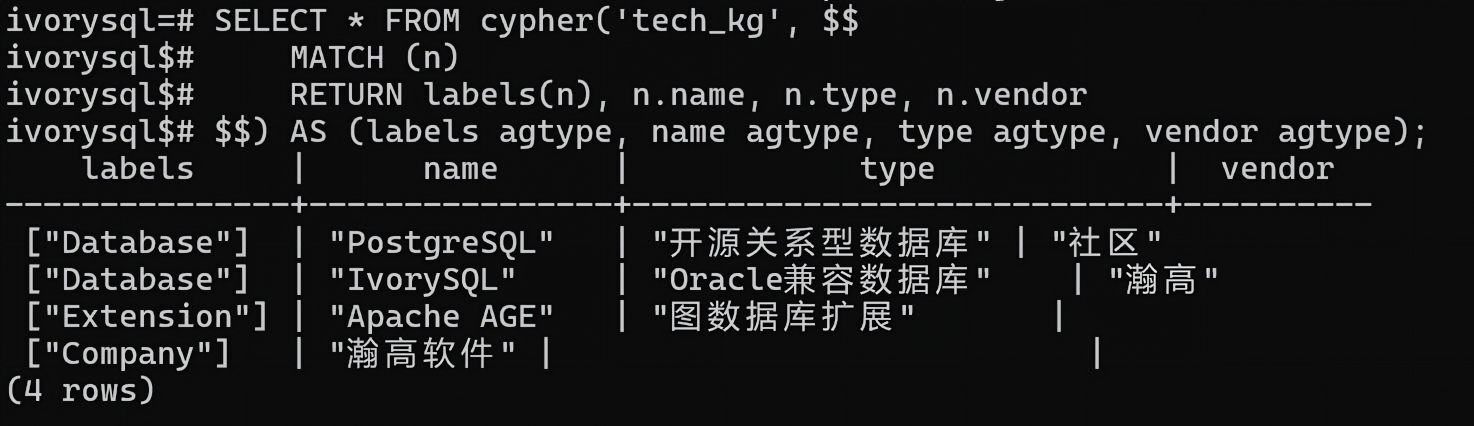
Operation 2-2: Create Nodes
Create 4 nodes in one batch (3 database/extension product nodes + 1 company node); Cypher supports multiple nodes after a single
CREATE.
-- Create all nodes in one batch
SELECT * FROM cypher('tech_kg', $$
    CREATE
    (pg:Database {name: 'PostgreSQL', type: '开源关系型数据库', vendor: '社区'}),
    (ivory:Database {name: 'IvorySQL', type: 'Oracle兼容数据库', vendor: '瀚高'}),
    (age_ext:Extension {name: 'Apache AGE', type: '图数据库扩展'}),
    (hg:Company {name: '瀚高软件', country: '中国', focus: '数据库'})
    RETURN labels(n), n.name
$$) AS (labels agtype, name agtype);
-- List the labels and names of all nodes
SELECT * FROM cypher('tech_kg', $$
    MATCH (n)
    RETURN labels(n), n.name, n.type, n.vendor
$$) AS (labels agtype, name agtype, type agtype, vendor agtype);
Operation 2-3: Create Relationships
Three relationships form a traversable graph: company → product → underlying + company → product → extension.
-- IvorySQL is based on the PostgreSQL kernel
SELECT * FROM cypher('tech_kg', $$
    MATCH (ivory:Database {name: 'IvorySQL'}), (pg:Database {name: 'PostgreSQL'})
    CREATE (ivory)-[r:BASED_ON {since: '2021', relationship: '内核分支'}]->(pg)
    RETURN r
$$) AS (rel agtype);

-- IvorySQL integrates the Apache AGE extension
SELECT * FROM cypher('tech_kg', $$
    MATCH (ivory:Database {name: 'IvorySQL'}), (age_ext:Extension {name: 'Apache AGE'})
    CREATE (ivory)-[r:SUPPORTS {since: '2024', feature: '图数据库'}]->(age_ext)
    RETURN r
$$) AS (rel agtype);

-- HighGo Software develops IvorySQL (the key edge for multi-hop traversal)
SELECT * FROM cypher('tech_kg', $$
    MATCH (hg:Company {name: '瀚高软件'}), (ivory:Database {name: 'IvorySQL'})
    CREATE (hg)-[r:DEVELOPS {since: '2021', role: '主导开发'}]->(ivory)
    RETURN r
$$) AS (rel agtype);

-- View all relationships
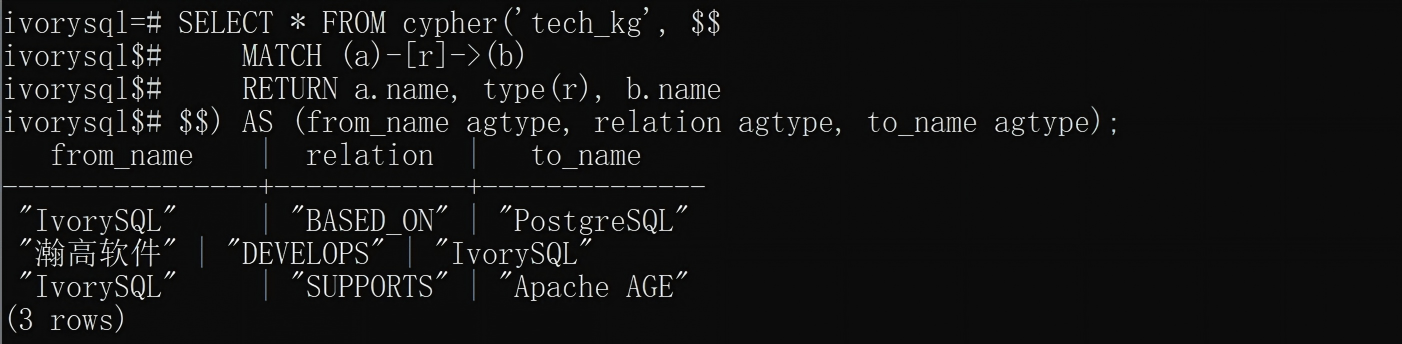
SELECT * FROM cypher('tech_kg', $$
    MATCH (a)-[r]->(b)
    RETURN a.name, type(r), b.name
$$) AS (from_name agtype, relation agtype, to_name agtype);
Operation 2-4: Graph Query
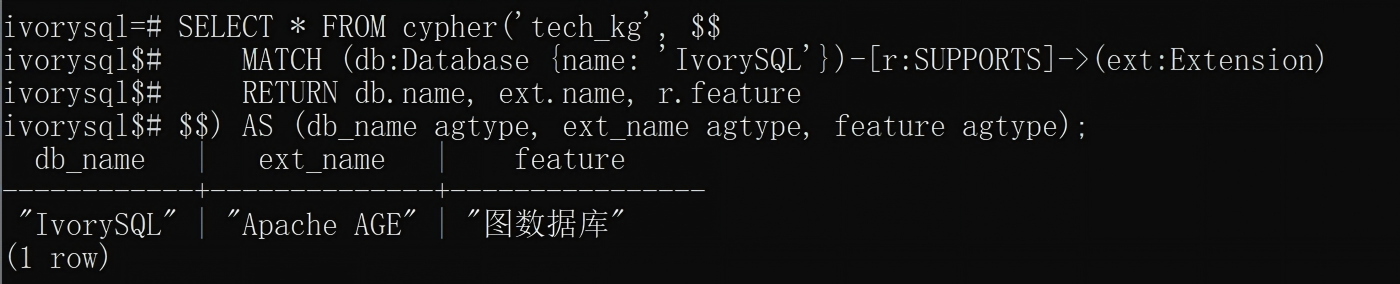
SELECT * FROM cypher('tech_kg', $$
    MATCH (db:Database {name: 'IvorySQL'})-[r:SUPPORTS]->(ext:Extension)
    RETURN db.name, ext.name, r.feature
$$) AS (db_name agtype, ext_name agtype, feature agtype);
| db_name | ext_name | feature |
|---|---|---|
| "IvorySQL" | "Apache AGE" | "Graph database" |
Operation 2-5: Multi-Hop Paths
With the company → product edge in place, multi-hop traversal becomes genuinely meaningful — starting from the company, you reach the technologies and extensions in 2 hops.
-- Query all 2-hop paths (company -> product -> technology/extension)
SELECT * FROM cypher('tech_kg', $$
    MATCH path = (a)-[*2]->(b)
    RETURN a.name, b.name
$$) AS (from_name agtype, to_name agtype);

2 paths are returned:
| Start | End | Path |
|---|---|---|
| "HighGo Software" | "PostgreSQL" | HighGo → IvorySQL → PostgreSQL (2 hops) |
| "HighGo Software" | "Apache AGE" | HighGo → IvorySQL → Apache AGE (2 hops) |
This is the core capability of a knowledge graph: starting from "HighGo" and traversing two relationship hops, you discover the PostgreSQL ecosystem and graph extensions it is indirectly associated with. If more nodes are added later (pgvector, pg_textsearch, etc.), multi-hop queries can automatically discover richer indirect relationships.
✅ Knowledge graph verification complete.
6.4 pg_bigm Chinese Full-Text Search
Verification scenario: 5 Chinese technical articles, verifying whether pg_bigm's bigram (2-gram) tokenization can perform efficient fuzzy search and similarity matching on Chinese content without dictionary-based tokenization.
Operation 3-1: Create the Extension + Data Table
CREATE EXTENSION IF NOT EXISTS pg_bigm;

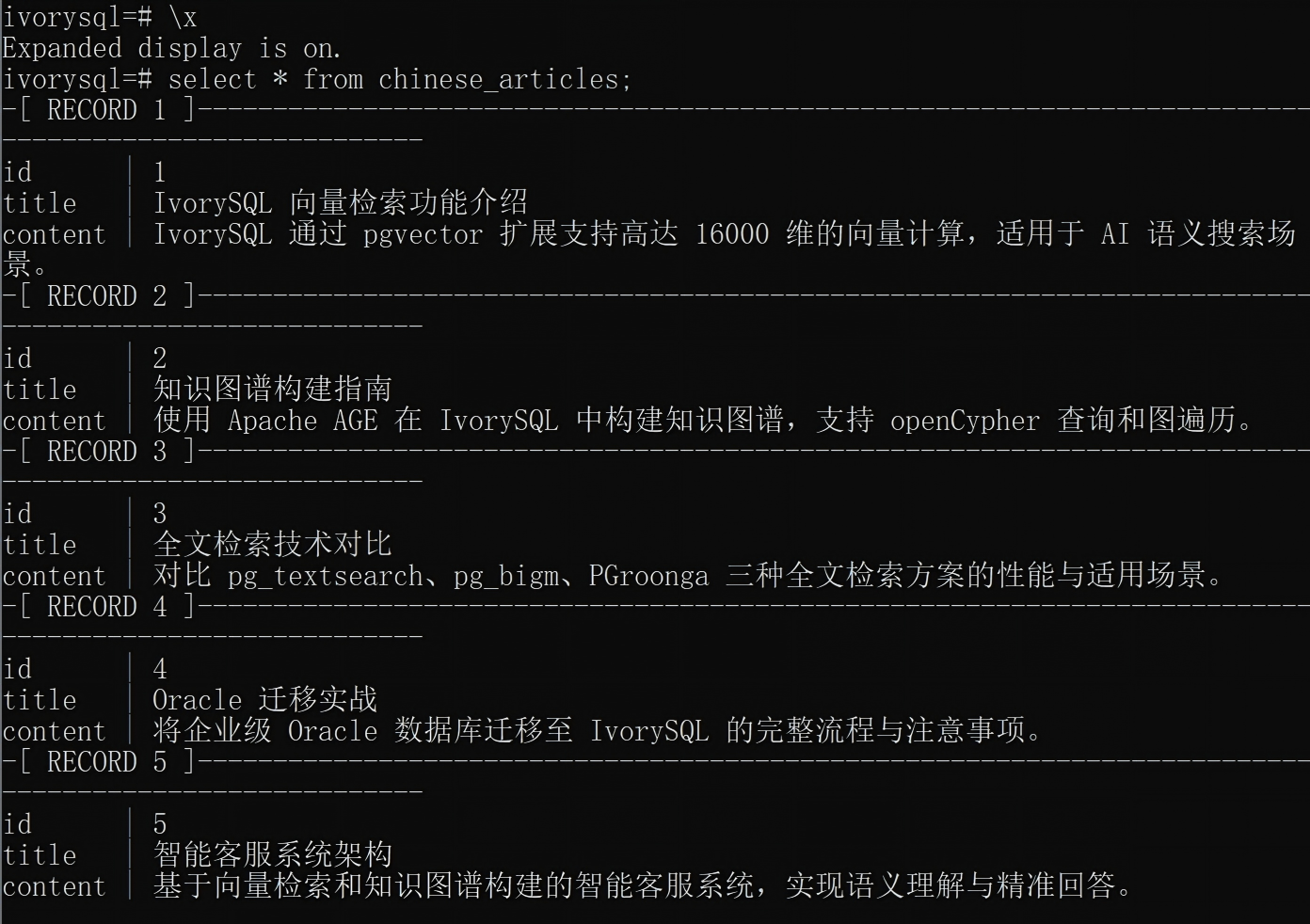
CREATE TABLE chinese_articles (id SERIAL PRIMARY KEY, title VARCHAR(200), content TEXT);

INSERT INTO chinese_articles (title, content) VALUES
('IvorySQL 向量检索功能介绍', 'IvorySQL 通过 pgvector 扩展支持高达 16000 维的向量计算,适用于 AI 语义搜索场景。'),
('知识图谱构建指南', '使用 Apache AGE 在 IvorySQL 中构建知识图谱,支持 openCypher 查询和图遍历。'),
('全文检索技术对比', '对比 pg_textsearch、pg_bigm、PGroonga 三种全文检索方案的性能与适用场景。'),
('Oracle 迁移实战', '将企业级 Oracle 数据库迁移至 IvorySQL 的完整流程与注意事项。'),
('智能客服系统架构', '基于向量检索和知识图谱构建的智能客服系统,实现语义理解与精准回答。');

select * from chinese_articles;
Operation 3-2: GIN Index + Fuzzy Search
CREATE INDEX chinese_articles_idx ON chinese_articles USING gin (content gin_bigm_ops);
SELECT id, title FROM chinese_articles WHERE content LIKE '%向量检索%';
SELECT id, title FROM chinese_articles WHERE content LIKE likequery('知识图谱');
SELECT show_bigm('IvorySQL 向量检索');
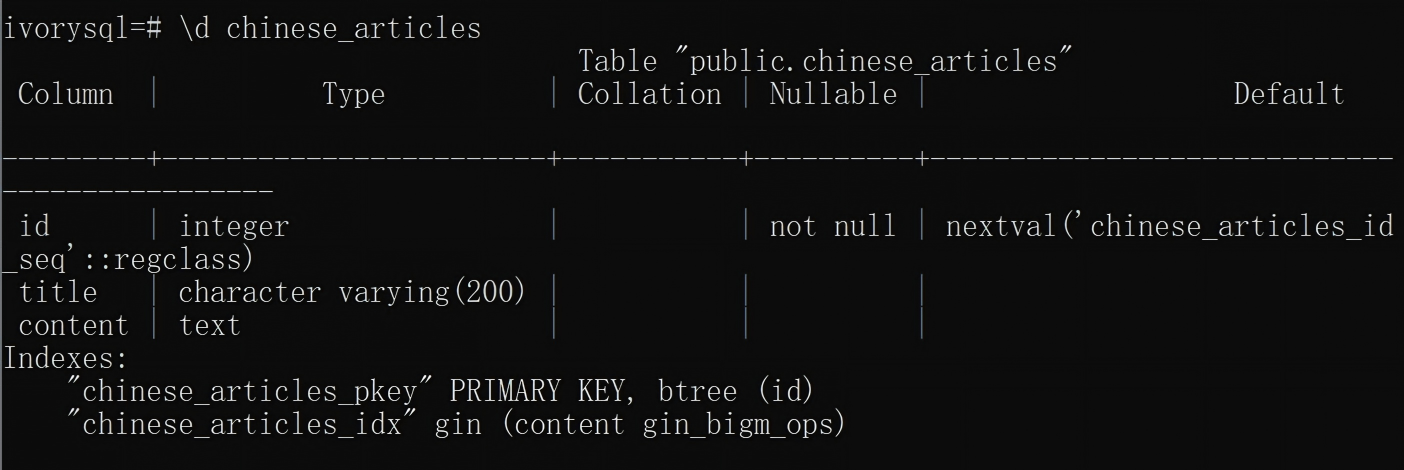
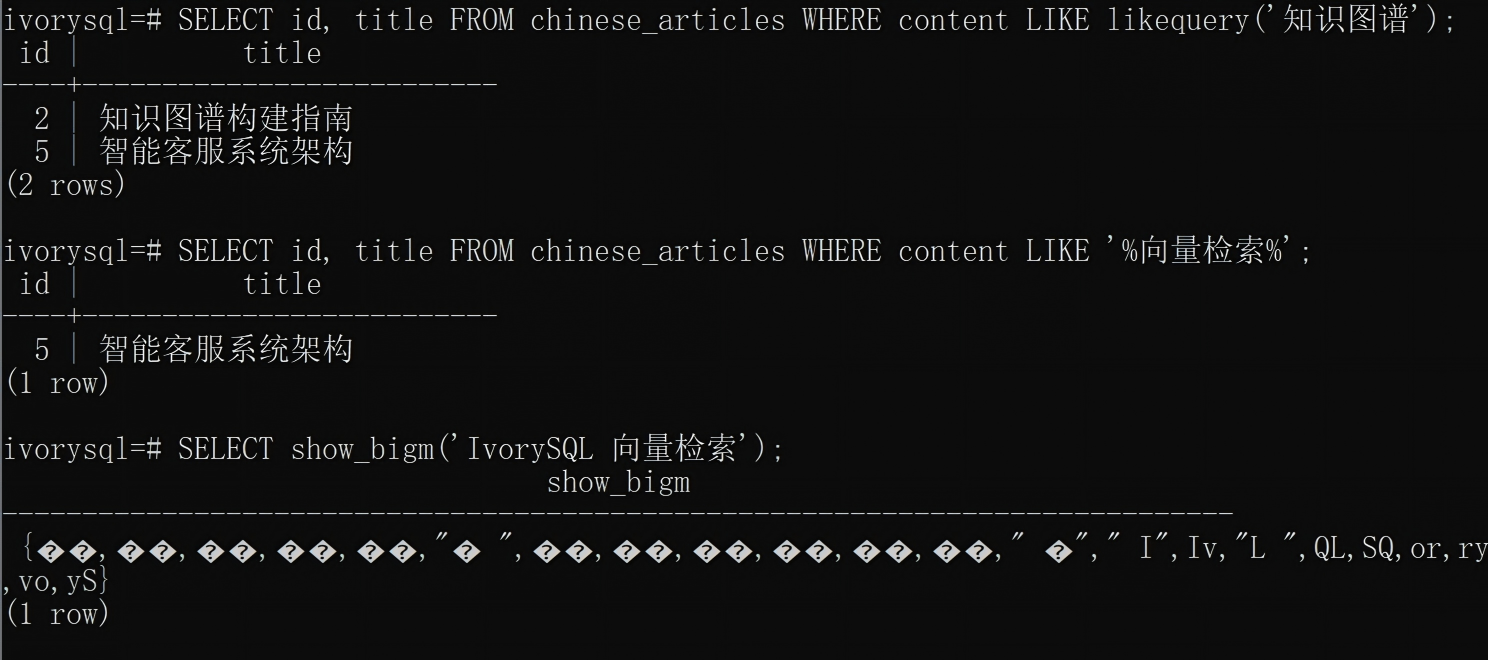
⚠️ Lesson learned: if the encoding is not explicitly specified in
POSTGRES_INITDB_ARGSwhen starting the container, the IvorySQL Docker image initializes the database with SQL_ASCII, which does not handle multi-byte character sets — in that case the Chinese output ofshow_bigmis displayed as boxes/garbled text. The underlying tokenization and retrieval logic (LIKE, likequery) matches correctly; only the terminal display is abnormal. The startup command in this article avoids the problem directly by specifying UTF-8 encoding viaPOSTGRES_INITDB_ARGS="--encoding=UTF8 --locale=C.utf8"; if you reuse an old container started without specifying the encoding, you need to recreate it with the encoding specified. Permanent fix: explicitly specify UTF-8 encoding throughPOSTGRES_INITDB_ARGSwhen starting the container (the startup command in Section 6.1 of this article already includes this parameter):
docker run --name ivorysql-verify1 \
-p 5434:5432 \
-e POSTGRES_INITDB_ARGS="--encoding=UTF8 --locale=C.utf8" \
-e IVORYSQL_PASSWORD=IvorySQL@2026 \
-d registry.highgo.com/ivorysql/ivorysql:5.4-ubi8
In practice you don't need to recreate an existing container — you can start another UTF-8-encoded container (e.g., on port 5436) and run only the SQL from 6.3 there to get clean
show_bigmoutput.

✅ pg_bigm verification complete.
6.5 BM25 Full-Text Search (pg_textsearch)
Verification scenario: 5 mixed Chinese/English technical documents, verifying pg_textsearch's BM25 index creation and phrase-search capability — whether it returns the correct relevance ranking (the more negative the score, the better) for English keywords under the
text_config='english'configuration.
pg_textsearch v0.6.1 is an early version (a stable v1.x exists) in the official IvorySQL 5.4 image;
CREATE EXTENSIONprintsWARNING: pg_textsearch v0.6.1 is a prerelease. Do not use in production.. The real meaning is not "absolutely unusable" — the BM25 algorithm itself is mature and the code is usable, but:
- The API may change when upgrading versions, and SQL you write may not be backward-compatible
- There is no official support commitment; problems in production may not be fixed promptly
- Performance has not been deeply tuned
Recommendation: feel free to use it in development/test environments; before production deployment you must run stress tests and compatibility validation.
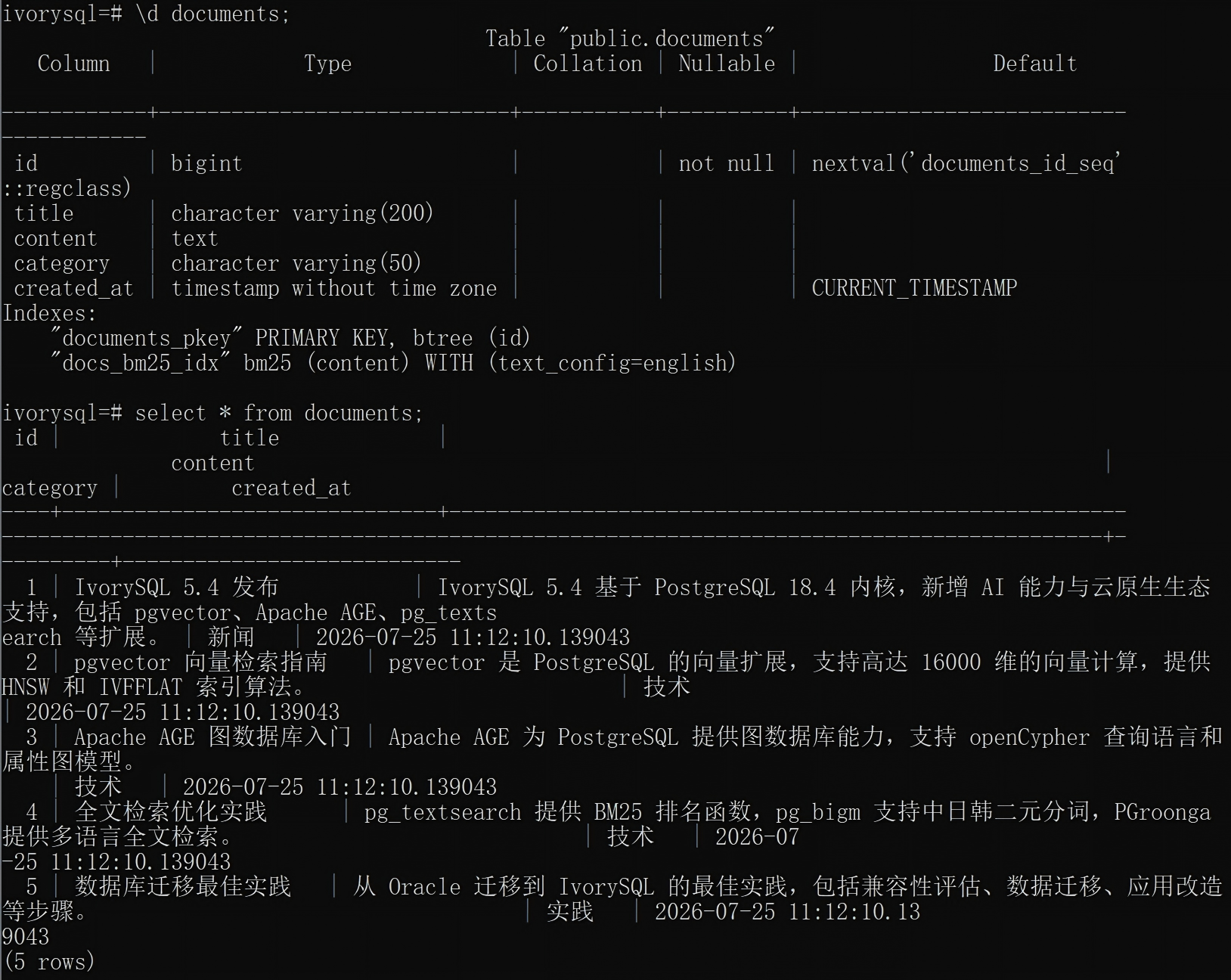
Operation 4-1: Create the Table, Insert Data, Create the BM25 Index
CREATE TABLE documents (id bigserial PRIMARY KEY, title VARCHAR(200), content text, category VARCHAR(50));

INSERT INTO documents (title, content, category) VALUES
('IvorySQL 5.4 发布', 'IvorySQL 5.4 基于 PostgreSQL 18.4 内核,新增 AI 能力与云原生生态支持,包括 pgvector、Apache AGE、pg_textsearch 等扩展。', '新闻'),
('pgvector 向量检索指南', 'pgvector 是 PostgreSQL 的向量扩展,支持高达 16000 维的向量计算,提供 HNSW 和 IVFFLAT 索引算法。', '技术'),
('Apache AGE 图数据库入门', 'Apache AGE 为 PostgreSQL 提供图数据库能力,支持 openCypher 查询语言和属性图模型。', '技术'),
('全文检索优化实践', 'pg_textsearch 提供 BM25 排名函数,pg_bigm 支持中日韩二元分词,PGroonga 提供多语言全文检索。', '技术'),
('数据库迁移最佳实践', '从 Oracle 迁移到 IvorySQL 的最佳实践,包括兼容性评估、数据迁移、应用改造等步骤。', '实践');

CREATE INDEX docs_bm25_idx ON documents USING bm25(content) WITH (text_config='english');

\d documents;
select * from documents;
Operation 4-2: BM25 Phrase Search
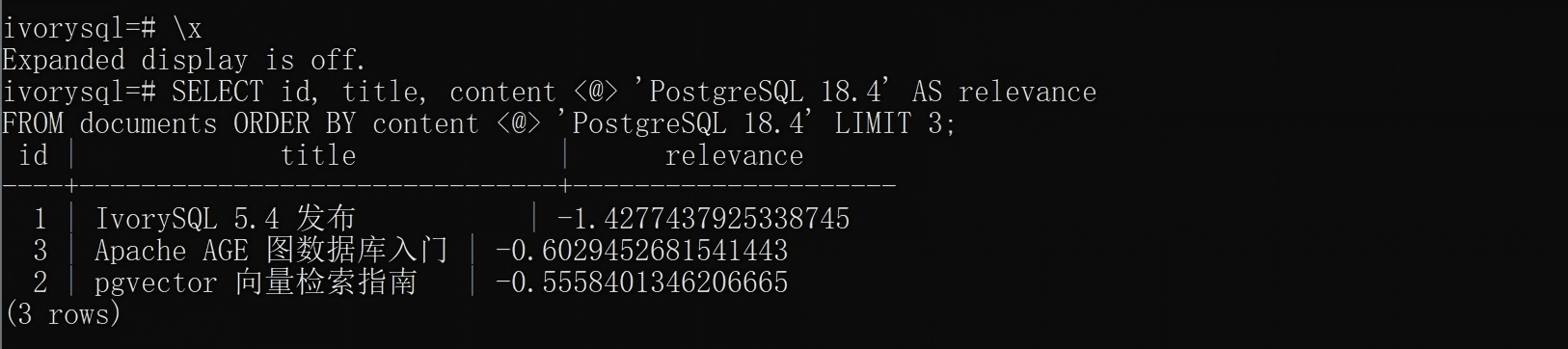
SELECT id, title, content <@> 'PostgreSQL 18.4' AS relevance
FROM documents ORDER BY content <@> 'PostgreSQL 18.4' LIMIT 3;
| id | title | relevance |
|---|---|---|
| 1 | IvorySQL 5.4 Released | -1.43 |
| 3 | Apache AGE Graph Database Primer | -0.60 |
| 2 | pgvector Vector Retrieval Guide | -0.56 |
✅ pg_textsearch verification complete.
See Section 4.3 in Chapter 4 for how to choose between pg_bigm and pg_textsearch.
6.6 Full Confirmation: Four Extensions Coexisting
SELECT extname, extversion FROM pg_extension
WHERE extname IN ('vector','age','pg_textsearch','pg_bigm') ORDER BY extname;
| extname | extversion |
|---|---|
| age | 1.7.0-rc0 |
| pg_bigm | 1.2 |
| pg_textsearch | 0.6.1 |
| vector | 0.8.5 |

6.7 Multimodal Fusion Collaborative Query Verification
Verification scenario: Sections 6.2–6.5 above verified the standalone capability of each extension; this section verifies the core value of multimodal fusion — one SQL that invokes vector retrieval, BM25 full-text search, and knowledge graph capability at the same time.
Preparation: Create the Helper Table rag_demo
-- Document-to-vector mapping table (in production it should be generated offline by an embedding service)
DROP TABLE IF EXISTS rag_demo;
CREATE TABLE rag_demo (
    doc_id INT PRIMARY KEY,
    emb vector(3)
);

INSERT INTO rag_demo VALUES
(1, '[0.10, 0.30, 0.50]'),
(2, '[0.20, 0.40, 0.60]'),
(3, '[0.30, 0.50, 0.70]'),
(4, '[0.40, 0.60, 0.80]'),
(5, '[0.50, 0.70, 0.90]');
Scenario A: Vector + BM25 Dual-Path Hybrid Recall (Typical RAG Scenario)
Fuse the vector similarity of the product Smart Watch Pro with the BM25 scores of keywords such as "smart wear" in the documents table through weighting, yielding more precise hybrid recall results.
-- 1. Make sure AGE is loaded and set search_path
LOAD 'age';
SET search_path = ag_catalog, "$user", public;

-- 2. Dual-path fusion: vector semantics + BM25 keywords
WITH vector_results AS (
    SELECT id AS vec_id,
           (1 - (embedding <=> (SELECT embedding FROM product_vectors
                                WHERE product_name = '智能手表 Pro')))::float8 AS semantic_score
    FROM product_vectors
),
fulltext_results AS (
    SELECT id AS ft_id,
           (content <@> to_bm25query('PostgreSQL 向量 检索', 'docs_bm25_idx'))::float8 AS keyword_score
    FROM documents
)
SELECT 'product-' || v.vec_id AS item_id,
       p.product_name,
       round((v.semantic_score)::numeric, 4) AS vec_score,
       round((f.keyword_score)::numeric, 4) AS bm25_score,
       round(((v.semantic_score * 0.7) + ((1 - f.keyword_score) * 0.3))::numeric, 4) AS hybrid_score
FROM vector_results v
JOIN product_vectors p ON p.id = v.vec_id
CROSS JOIN fulltext_results f
ORDER BY hybrid_score DESC
LIMIT 5;
Measured results:
| item_id | product_name | vec_score | bm25_score | hybrid_score |
|---|---|---|---|---|
| product-2 | Fitness Band | 1.0000 | -0.6029 | 1.1809 |
| product-1 | Smart Watch Pro | 1.0000 | -0.6029 | 1.1809 |
| product-5 | Wireless Earbuds | 1.0000 | -0.6029 | 1.1809 |
| product-1 | Smart Watch Pro | 1.0000 | -0.5558 | 1.1668 |
| product-2 | Fitness Band | 1.0000 | -0.5558 | 1.1667 |
Verification conclusion: vector retrieval (pgvector) and full-text search (pg_textsearch) can be executed jointly in the same SQL and achieve hybrid ranking for RAG scenarios through custom weights — no cross-database access, and no need to introduce Elasticsearch or an external re-ranking service.

Scenario B: Graph + Relational Table Combined Analysis
Use Cypher to find all extension names integrated by IvorySQL, then JOIN the documents table to get the articles corresponding to those extensions — one query completes "graph traversal + relational table JOIN".
-- 1. Make sure AGE is loaded
LOAD 'age';
SET search_path = ag_catalog, "$user", public;

-- 2. Cypher query for all extensions supported by IvorySQL
WITH extensions AS WITH extensions AS (
    SELECT * FROM cypher('tech_kg', $$
        MATCH (db:Database {name: 'IvorySQL'})-[:SUPPORTS]->(ext:Extension)
        RETURN ext.name AS ext_name
    $$) AS (ext_name agtype)
)
-- 3. JOIN the documents table, listing the article for each extension
SELECT e.ext_name::text AS extension_name,
       d.title,
       d.category
FROM extensions e
JOIN documents d ON d.content LIKE '%' || e.ext_name::text || '%'
ORDER BY extension_name;
Verification conclusion: Cypher graph query results can be directly JOINed with relational tables; IvorySQL provides both a graph engine and a relational engine in the same instance — this is the key capability that distinguishes a "unified data foundation" from a multi-component architecture.

Scenario C: Vector + BM25 + Graph Three-Mode Fusion
Building on the previous two scenarios, add the graph's relationship-inference results as a filter condition to the vector + BM25 dual-path fusion.
LOAD 'age';
SET search_path = ag_catalog, "$user", public;

-- 1. Find all extension names associated with IvorySQL via the graph (used for filtering)
WITH related_ext AS (
    SELECT ext_name::text AS ext_name FROM cypher('tech_kg', $$
        MATCH (db:Database {name: 'IvorySQL'})-[:SUPPORTS]->(ext:Extension)
        RETURN ext.name AS ext_name
    $$) AS (ext_name agtype)
),
-- 2. Articles in documents related to these extensions
filtered_docs AS (
    SELECT d.id, d.title, d.content
    FROM documents d
    WHERE EXISTS (
        SELECT 1 FROM related_ext r WHERE d.content LIKE '%' || r.ext_name || '%'
    )
)
-- 3. Find the documents most semantically similar to "PostgreSQL" with the highest BM25 scores
SELECT f.id,
       f.title,
       round((1 - (g.emb <=> (SELECT emb FROM rag_demo WHERE doc_id = 1)))::numeric, 4) AS vec_score,
       round((f.content <@> to_bm25query('PostgreSQL', 'docs_bm25_idx'))::numeric, 4) AS bm25_score
FROM filtered_docs f
JOIN rag_demo g ON f.id = g.doc_id
ORDER BY vec_score DESC
LIMIT 3;
Note: this scenario demonstrates the syntactic structure of three-mode fusion.
rag_demois a simplified document-to-vector mapping table (in production it can be generated offline by an embedding service). Readers can adapt this query to their own data.
Verification conclusion: vector retrieval + BM25 full-text search + graph reasoning can work collaboratively in the same SQL, verifying the feasibility of IvorySQL as a "unified data foundation" — this is the core question this article series intends to answer.

7. Linux Virtual Machine Deployment Option (Optional Alternative)
⚠️ All test cases in this article were verified in the Docker environment of Chapter 6 above. The following Linux bare-metal deployment is an optional alternative path for production, for readers who need to install directly onto physical machines or virtual machines.
7.1 Environment Requirements
- OS: RockyLinux 8+ / RHEL 8+ / Ubuntu 22.04+
- CPU: x86_64 or ARM64
- Memory: ≥ 4GB (8GB+ recommended)
- Disk: ≥ 20GB
7.2 YUM Installation (Recommended)
⚠️ Pitfall reminder 1: Highgo's IvorySQL RPM package is installed to
/usr/ivory-5/by default (not/opt/IvorySQL-5.4/). All commands below have been corrected to the actual path.⚠️ Pitfall reminder 2: if the system has the PGDG repository installed (pgdg13 is already EOL), dnf may hang while resolving dependencies and report a 410 error. The commands below use
--disablerepo=pgdg13to bypass it.
# 1. Create the YUM repository
sudo tee /etc/yum.repos.d/ivorysql.repo > /dev/null << 'EOF'
[ivorysql5]
name=IvorySQL Server 5 $releasever - $basearch
baseurl=https://yum.highgo.com/dists/ivorysql-rpms/5/redhat/rhel-$releasever-$basearch
enabled=1
gpgcheck=0
EOF

# 2. Install IvorySQL 5.4
sudo dnf install -y ivorysql5-5.4 --disablerepo=pgdg13

# 3. Create the user and grant ownership
sudo useradd ivorysql
sudo chown -R ivorysql:ivorysql /usr/ivory-5/

# 4. Set environment variables
sudo tee -a /home/ivorysql/.bash_profile > /dev/null << 'EOF'
PATH=/usr/ivory-5/bin:$PATH
export PATH
PGDATA=/usr/ivory-5/data
export PGDATA
EOF

sudo su - ivorysql
source ~/.bash_profile

# 5. Initialize the database (Oracle compatibility mode)
initdb -D /usr/ivory-5/data -m oracle

# 6. Start the service
pg_ctl -D /usr/ivory-5/data -l ivory.log start

# 7. Verify the status
pg_ctl status
psql -d ivorysql -c "SELECT version();"

7.3 Source Compilation Reference (Custom Requirements)
Note: 7.2 (binary RPM) and 7.3 (source compilation) are alternative options — pick one; they are not sequential steps. If you already installed via RPM, uninstall it first before compiling from source:
sudo dnf remove ivorysql5-5.4.⚠️ Dependencies:
--with-uuid=e2fsrequires the UUID development library (installlibuuid-develon Rocky/CentOS/RHEL,uuid-devon Ubuntu/Debian). If not installed, configure reportslibrary 'uuid' is required for E2FS UUID. Install the dependency first, then compile.
# 1. Install dependencies (libuuid-devel is required for --with-uuid=e2fs)
# Rocky/CentOS/RHEL:    libuuid-devel
# Ubuntu/Debian:        uuid-dev
sudo yum install -y gcc gcc-c++ make bison flex readline-devel zlib-devel openssl-devel libxml2-devel libxslt-devel perl-ExtUtils-Embed libuuid-devel

# 2. Download the source code
git clone --branch IvorySQL_5.4 https://github.com/IvorySQL/IvorySQL.git
cd IvorySQL

# 3. Configure and compile (see the remarks below for each option)
./configure --prefix=/usr/ivory-5 \
    --enable-debug \    # Enable debug symbols (usable with gdb); enable for development/troubleshooting, recommended to drop in production
    --enable-cassert \  # Enable internal assertion checks; performance drops about 5-10%, development/debugging only
    --with-uuid=e2fs \  # UUID generation method; choose the e2fs library (more stable than the default oosp)
    --with-libxml       # XML type support; recommended to keep for knowledge management and document processing scenarios

make -j$(nproc)
sudo make install

# 4. Initialize and start (same as above)
7.4 Production Risk Notes
The following risks must be evaluated before deploying to production:
| Risk Dimension | Current Status | Recommendation |
|---|---|---|
| pgvector version | v0.8.5 (continuously maintained in 2026) | Watch the memory peak of HNSW with large data volumes; run stress tests in advance |
| Apache AGE version | PG18/v1.7.0-rc0 prerelease | For production, wait for the official release (v1.8.0 is already released and can be upgraded) |
| pg_textsearch version | v0.6.1 prerelease | Performance not deeply tuned; API may change; run your own stress tests before launch |
| pg_bigm version | v1.2 (stable) | Evaluate the space taken by the GIN index at large data volumes |
| Multi-extension compatibility | The four extensions coexist but no SLA is officially declared | Regression-test before upgrading the IvorySQL major version |
| shared_preload_libraries | age + pg_textsearch must be preloaded | Limited by managed PG services (RDS, Cloud SQL) which may not support it |
| Database encoding | SQL_ASCII by default | Must explicitly specify UTF-8 encoding to avoid garbled Chinese text |
Recommended landing path:
- Development/test (✅ verified) → directly use the Docker image in this article plus in-container compilation
- Pre-release verification (recommended) → build a custom image with a Dockerfile, deploy to a pre-release environment and run regression tests
- Production launch (with caution) → wait for the official AGE/pg_textsearch releases, or at least complete 1 week of stress testing
8. Key Conclusions and Recommendations
8.1 Support Summary
| Dimension | Conclusion |
|---|---|
| Vector data | ✅ Fully supported. Through the pgvector extension: 16,000-dim vectors, HNSW/IVFFLAT indexes, multiple distance algorithms, usable in Oracle compatibility mode. |
| Knowledge graph | ✅ Fully supported. Through the Apache AGE extension: openCypher, property graphs, hybrid SQL queries. Suitable for medium-scale knowledge graphs; dedicated graph databases are recommended at very large scale. |
| Full-text search | ✅ Fully supported. Multi-extension solution (pg_textsearch/pg_bigm/PGroonga), covering BM25, CJK tokenization, fuzzy search, hybrid search, and more. |
⚠️ This article focuses on functional feasibility verification and does not cover performance benchmarking. Performance data such as HNSW query latency, BM25 index ingestion time, and hybrid retrieval throughput will be tested and verified in follow-up articles.
8.2 Selection Recommendations
- Quick evaluation: deploy IvorySQL 5.4 with Docker; the environment can be set up in 5 minutes
- Development/test: install via YUM/DNF (contains only the IvorySQL core; multimodal extensions must be compiled separately, verification in 7.5), convenient for integration with existing CI/CD pipelines
- Production environments: recommend DEB/RPM installation, paired with IvorySQL Cloud for visual operations
- Oracle migration: make full use of IvorySQL's Oracle compatibility mode to reduce migration costs
- AI scenarios: the pgvector + pg_textsearch combination delivers the semantic + keyword hybrid retrieval required by RAG
- Intelligent knowledge-base scenarios: full-text search (BM25) + vector retrieval (HNSW) + knowledge graph (Cypher queries) can all perform hybrid retrieval inside a single IvorySQL instance, with no external components needed — this is IvorySQL's core advantage as a "unified data foundation" over multi-component architectures.
8.3 Ecosystem Extension List (Supported by IvorySQL 5.4)
IvorySQL 5.4 officially supports more than 20 extensions; the core ones include:
- AI/vector: pgvector, pg_ai_query
- Graph database: Apache AGE
- GIS: PostGIS, pgRouting
- Chinese processing: pg_jieba, zhparser, pg_bigm
- Full-text search: PGroonga, pg_textsearch
- Operations: pg_cron, pgagent, system_stats, pg_stat_monitor
- Middleware: PgBouncer, redis_fdw
9. Community Outlook and Suggestions
In this article, on Windows 11 + Docker Desktop and based on the official 5.4-ubi8 image, four extensions were compiled from source, fully verifying the multimodal fusion capabilities of "vector + knowledge graph + full-text search" on IvorySQL 5.4 (see Chapters 6 and 7 for the verification process). On this basis, and from the perspective of "making it convenient for users", the article organizes the delivery work the community is currently doing for this capability into three tiers: done / not done / can be suggested.
9.1 What the Community Has Done: Conveniences Provided for Multimodal Fusion
- Version endorsement: the IvorySQL 5.4 Release Notes officially list pgvector / Apache AGE / pg_bigm / pg_textsearch in the supported list, i.e., the official team has verified and endorsed that these extensions run on 5.4.
- Available base distributions: the
5.4-ubi8standard image and theivorysql5-5.4yum/RPM package let users obtain an Oracle-compatible PG 18 instance out of the box (with theivorysql_ora/liboracle_parser/gb18030_2022base extensions preinstalled by default). - The upstream extensions themselves are usable: the four multimodal extensions are maintained by their respective upstream communities, and this article verified that they compile and run on the IvorySQL 5.4 source tree — the "multimodal fusion" capability is genuinely reachable, not stuck on a roadmap.
9.2 What the Community Has Not Done: The Gap from "Supported" to "Out of the Box"
- No extension binary packages built for IvorySQL 5.4: users cannot obtain the multimodal extensions directly via
dnf install. Although the official PostgreSQL RPM source (PGDG — the same source where you can findpgvector_14~17) does providepgvector_14~18,age_14~18, andpg_bigm_14~18RPMs for native PostgreSQL, they are built for native PG and cannot be equated with the community having prepared conveniences for IvorySQL users. - The standard image does not preinstall the multimodal extensions:
5.4-ubi8ships with only the Oracle-compat base extensions by default; pgvector / AGE / pg_bigm / pg_textsearch all require users to compile them. - No official one-click "multimodal fusion" image / Dockerfile: to fuse out of the box, users currently must assemble it themselves following Section 6.1 of this article.
- pg_textsearch is entirely absent from package sources: no standalone RPM can be found in either the PGDG or the official IvorySQL yum/apt sources (verified in this article on both the PGDG yum and apt sides); source compilation is the only route.
9.3 Suggestions: Paths to Close the Delivery Gap (Recommendations)
- Prioritize official binary packages built for IvorySQL 5.4: publish extension packages compiled for IvorySQL 5.4 under naming consistent with the core
ivorysql5-5.4(e.g.,ivorysql5-pgvector— the name is illustrative only; this package does not currently exist), letting usersCREATE EXTENSIONwithout compiling. This is the common practice of most PG distributions and fits existing deployment habits best. - Maintain a companion "multimodal fusion" image / Dockerfile: while keeping the base image lean (focused on Oracle compatibility), additionally provide an
ivorysql-multimodaltag or an officially maintained Dockerfile for readers who need "fusion out of the box" — the verification path in Section 6.1 of this article has proven it feasible. - Deliver per-extension to avoid maturity risks: pgvector 0.8.5 is stable, but AGE's PG18 branch is 1.7.0-rc0 (prerelease) and pg_textsearch is v0.6.1 (early version). Distributing independent binary packages per extension lets users take what they need on demand and also prevents prerelease components from dragging down the stable standard image.
IvorySQL's core differentiator is "unified data foundation, multimodal fusion", and whether fusion is "out of the box" directly determines its competitiveness in AI / RAG / knowledge-base scenarios. We look forward to the official team gradually closing this delivery gap — this article is a reproducible starting point in that direction.
10. Reference Resources
- IvorySQL Official Website
- IvorySQL Official Documentation
- IvorySQL GitHub
- pgvector Official Documentation
- Apache AGE Official Documentation
- Apache AGE GitHub (apache/age)
- pg_bigm Official Documentation
- pg_textsearch GitHub (timescale/pg_textsearch)
- IvorySQL 5.4 Release Notes
All test cases have been fully reproduced and verified on Windows 11 + Docker Desktop (IvorySQL 5.4 image).
Previous post
PostgreSQL 18/19 New Features in Depth: From I/O Prefetch to Intelligent Operations, Elevating the Database Experience
Aug 4, 2026
Next post
The Future Evolution of PostgreSQL Logical Replication
Aug 11, 2026
Related Posts

Try IvorySQL
Get started with IvorySQL today. Read the docs or try our online demo.